Attendance verified by phones already in the room
Faculty and HODs start sessions in Presenze Dashboard. Their phone becomes the secure BLE advertiser, student phones scan when marking attendance, and every verified record appears in the Admin Portal in real time.
Everything attendance needs, from BLE verification to ERP control
Presenze keeps the product surface simple: one student app, one shared Dashboard app for Faculty and HOD roles, and one Admin Portal for the institution.
Bluetooth Low Energy Attendance
Faculty phone advertises a secure live session while student phones scan and verify presence over BLE within seconds. Verified records instantly sync through the Go backend to Supabase and appear live in the Admin Portal.
Role-Based Authentication & Security
Faculty and HODs use the same Presenze Dashboard app with screens and permissions tailored to their role. Secure cloud backend validates sessions and writes clean, auditable attendance records with full traceability.
Student Mobile App
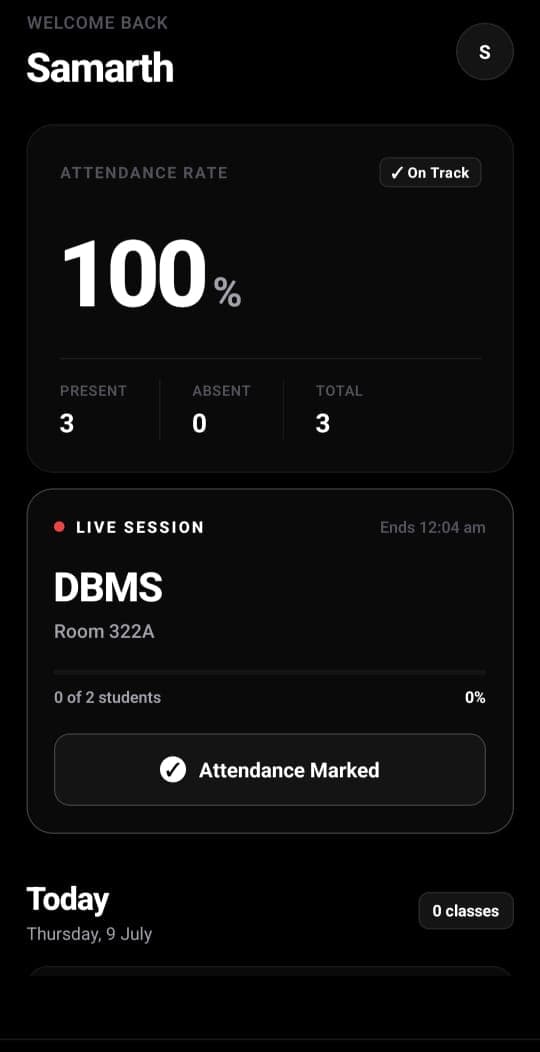
Students get Mark Attendance, history, timetable, notifications, and profile access in one streamlined app. Receive timely attendance, timetable, and administrative updates directly through push notifications.
Faculty & HOD Dashboard
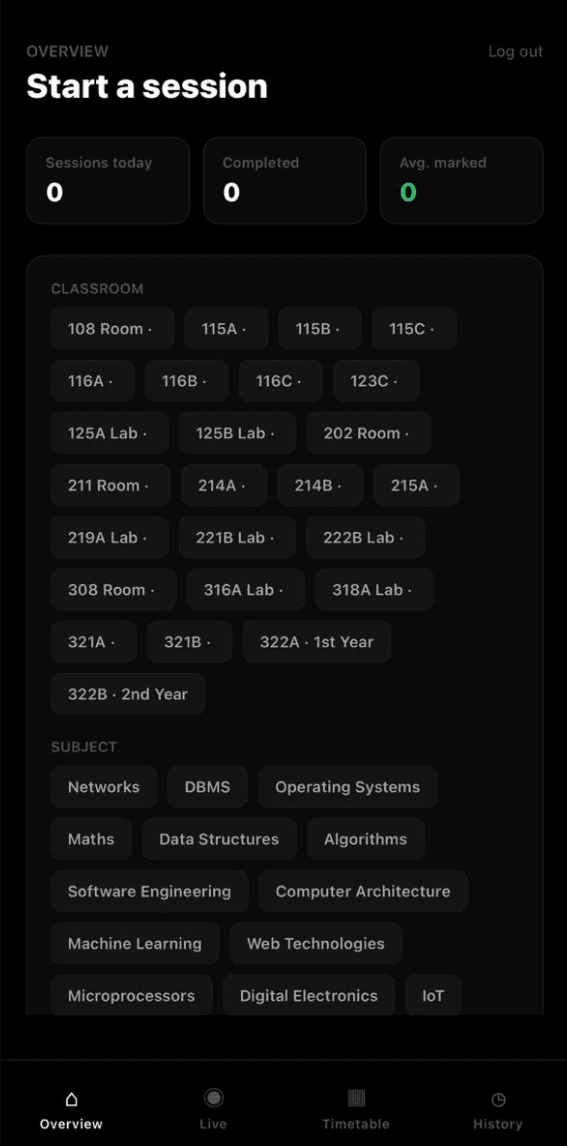
Start sessions, monitor live detection, review classes, and access role-scoped academic views on mobile. Connect to official timetables so faculty start the right class with minimal manual setup.
Admin ERP Portal
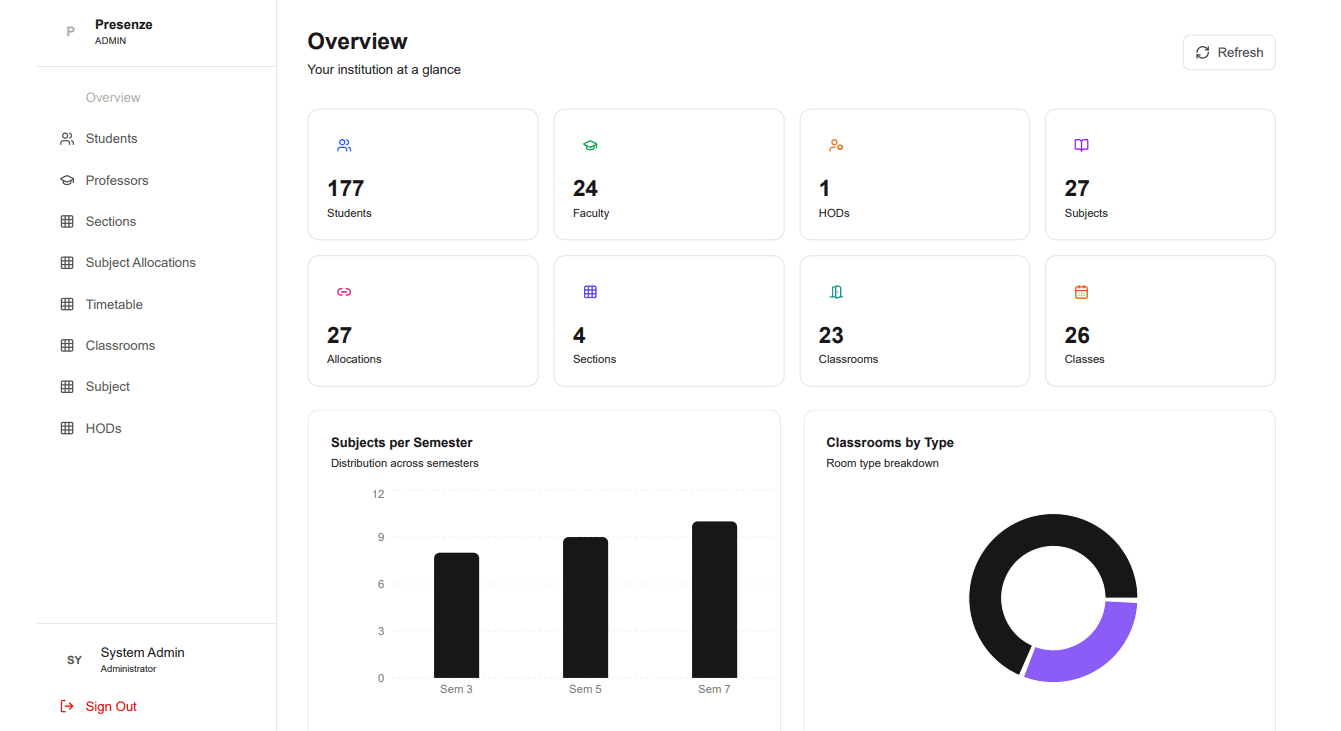
Web portal for managing students, faculty, HODs, departments, classrooms, users, reports, and analytics. Bulk import institutional data via Excel without rebuilding records manually.
Attendance Analytics & Reports
Track attendance by student, subject, section, department, or timeframe without manual spreadsheet work. Generate comprehensive reports and insights for data-driven decision making.
Department & Academic Management
Organize departments, HOD access, classroom allocation, and academic reporting from one unified layer. Model courses, semesters, sections, subjects, and allocations so attendance lands in the correct record.
Offline Resilience
Temporary network drops don't break sessions; queued records reconcile automatically when connectivity returns. The system ensures no attendance data is lost even during connectivity issues.
Scalable Campus Infrastructure
The mobile BLE pattern scales from one department to full campus without requiring classroom hardware. Designed to grow with your institution's needs while maintaining performance and reliability.
Want to see how it all works together?
A professor-led signal, student scanners, and instant ERP records
Follow the complete journey from BLE broadcast to real-time Admin Portal visibility
Live Attendance Path
From BLE Signal to Admin Portal
Faculty/HOD opens Presenze Dashboard
Shared mobile app authenticates the user and loads role-appropriate screens. Session links to class, subject, timetable, and room automatically.
Phone requests Bluetooth & becomes advertiser
App requests the Bluetooth access needed to run the live BLE flow. Professor's phone then broadcasts a secure session signal nearby.
Students open Presenze app
Students use the dedicated Presenze student app for attendance and tap Mark Attendance to start scanning only for the active, valid classroom session.
Student phones scan for advertiser
Scanner phones detect the Dashboard advertiser over Bluetooth Low Energy and identify the active session signal.
Attendance verified
System validates session token, student identity, and BLE proximity to ensure authentic presence verification.
Uploaded to Go backend
Verified events sent to backend for validation and persistence with complete audit trail.
Stored in Supabase
Clean records written to database with real-time Admin Portal sync for instant visibility.
Live Admin Portal updates
Records appear instantly in the web-based Admin Portal where administrators can view, manage, and analyze attendance data in real-time.
No Classroom Hardware Required
Unlike traditional systems that require fixed RFID readers or biometric devices in every classroom, Presenze uses the phones already in everyone's pockets. Faculty phones act as BLE advertisers, student phones scan, and the entire flow happens through mobile apps.
Three surfaces, one attendance record
Students use Presenze, Faculty and HODs share Presenze Dashboard, and administrators manage the institution from the web portal.
Student App
Mark attendance, review history, and follow timetable
Faculty & HOD Dashboard
One Dashboard app with role-based controls
Admin Portal
Institution-wide management and analytics
Two Mobile Apps, One Admin Portal
Presenze keeps daily attendance mobile while the web portal manages institutional structure, records, and analytics.


Presenze
Students mark attendance, review history, follow timetables, and stay connected with their academic schedule.
Presenze Dashboard
One shared mobile app with role-based authentication for session control, live monitoring, and academic visibility.


Admin Portal
Institution control layer for academic structure, student records, faculty management, reports, analytics, and bulk imports.
Presenze and Presenze Dashboard are currently in development. The Admin Portal is live and ready for institutional setup. Mobile releases will follow with full BLE attendance capabilities.
A classroom problem, solved as campus infrastructure

Samarth Ravi Y
Founder
What started as a frustration with paper attendance in my own classes became Presenze. A mobile-first BLE solution that removes friction from the daily routine. I built this to prove that campus infrastructure can feel modern and effortless, not just digitized. Now, we're expanding beyond attendance to create tools that institutions actually want to use.
Great software is not just faster.
It makes the correct process feel natural.
The details Institutions ask before rollout
Common questions about how Presenze works, what it requires, and how it scales.
Faculty or HOD opens Presenze Dashboard and starts a session. Their phone requests Bluetooth permission and becomes the BLE advertiser. Students open Presenze, tap Mark Attendance, and their phones scan for the live session. Verified attendance uploads to the Go backend, stores in Supabase, and appears in the Admin Portal instantly.
Bringing Presenze to a new campus?
Connect with us to discuss institutional setup, implementation, or partnership opportunities.